 Italiano IT
 English EN
 Français FR

How to streamline the sales back office in 2026
In manufacturing companies, order entry automation is one of the first practical steps towards cutting the manual back-office work that slows production down. A customer order rarely enters the ERP on its own: it arrives by email, as an attachment, and someone retypes it by hand.
It is repetitive, largely invisible work with a real cost. Every hour spent typing codes and quantities is an hour taken away from customer service, and every delay in entering an order also delays the start of production.
With a few orders a day the problem goes unnoticed, but with dozens of orders from different customers it becomes a bottleneck.
The problem is not the order itself, but its form. Every customer uses a different format: a PDF generated by their own ERP, a scan, an image, a file with the layout they have always used. There is no standard, so an operator has to read, interpret and type in the data line by line, with the risk of getting an item code or a quantity wrong.
In this article we look at how an AI agent can take over this step, where a person is still needed, and how it worked in practice at a company that makes self-adhesive labels and till rolls.
The costs of a traditional back office
Entering an order by hand seems like a job of a few minutes, but the cost only becomes visible when you add up its effects. Four are the most common in companies that receive orders by email:
- Time: Every order has to be read, interpreted and typed in. Added up over a week, these minutes become hours taken away from more valuable work, such as answering customers or checking deliveries.
- Errors: A wrong item code or a swapped quantity leads to an incorrect production order, often discovered only once work has started.
- Delays: An order received out of hours waits for someone to enter it, and production starts later than it could.
- Dependence on people: Customer quirks, such as a code that has a different name in their system, are often known to only one person.
The cost also grows with volume, because manual data entry does not scale. Receiving the order as a PDF is already digital, but if someone has to retype it the process remains manual, and every extra order needs more hours and, sooner or later, more people.
A simple calculation makes the cost visible: orders per month × minutes per order × operator hourly cost. A hypothetical example, to be replaced with real data: with 200 orders a month and 10 minutes per order, you need more than 33 hours a month, around 400 hours a year, spent on typing alone.
That is why order entry automation is not just a question of efficiency. It also reduces an operational risk that nobody measures as long as the work stays manual.
Why “we’ve always done it this way” is no longer enough
Traditional solutions for automatic order entry work by rules: if the document has this layout, look for the code in this position and the quantity in that one. They work as long as documents stay the same, and break at the first change.
With orders arriving from dozens of customers, and sometimes made up of images, each format would need its own configuration, to be updated with every change. The maintenance work risks costing almost as much as the manual data entry it was meant to eliminate.
An AI agent starts from a different logic. It does not look for a field in a fixed position: it reads the document, understands its content and turns it into structured data, even when the format is new. Any doubt surfaces in the validation step, where a person checks the result.
It is the difference between a system that recognises a form and one that understands an order. For companies whose customers each use their own format, this is what makes order entry automation workable without a configuration project for every customer.
donia: AI for order entry automation
donia® is Logikamente’s Agentic Workflow platform: a set of AI agents that carry out, in sequence, the activities of a business process. In the sales back office, order entry automation follows five steps.
- Receipt: A check on the dedicated mailbox, for example orders@company.com, runs every 2 minutes and downloads the attachments. The order enters the process without anyone having to open the mail.
- Reading: The agent reads the text of the email and interprets the documents, even when the PDF is made up of images, thanks to intelligent OCR extraction.
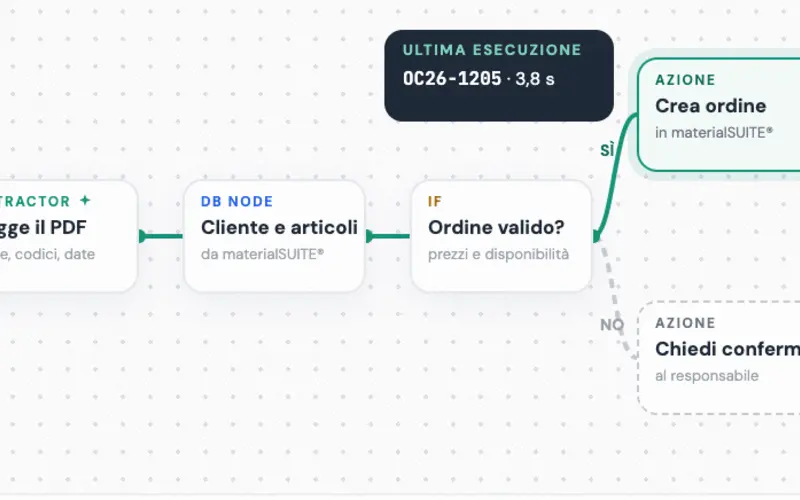
- Extraction and matching: It identifies the item codes and the customer master data, and links them to those in the ERP.
- Validation: The operator checks the extracted data in an intermediate area and validates it with a quick review before it is exported to the ERP.
- Sending to the ERP: The data enters the ERP as digital records, ready for production.
The flow runs continuously, so an order received out of hours has already been processed when the office opens again. If the order arrives through a channel other than the dedicated mailbox, the operator can upload it directly into a chat by dragging the file, and interact with the agent in natural language.
This approach overcomes the rigidity of traditional methods: the agent adapts to the documents, instead of asking customers to adapt to a form.
The Gruppo Aro S.p.A. case
Gruppo Aro is based in Cavaria con Premezzo, in the province of Varese, Italy. For more than 40 years it has designed and manufactured self-adhesive labels, till rolls and packaging solutions.
The challenge was the one described at the start: customer orders in PDF, in non-standard formats and partly made up of images, to be turned into data the ERP could use. Before the project this took hours of manual work.
With donia® the process starts from the mailbox dedicated to orders and runs all the way to the ERP. In the implementation for Aro, the system achieves 100% accuracy in identifying item codes and customer master data, and leaves the operator a quick validation before the final submission to the production system.
The project reports three benefits: shorter entry times, more accurate data and operational continuity, because the flow stays active 24 hours a day, seven days a week. For a company with many item codes, having data checked before it reaches the ERP is the most tangible advantage of order entry automation.
How the back-office operator’s role changes
Order entry automation does not mean giving up control. In the flow described, a person still has the final say: the agent proposes the data, the operator validates it, and only then does it reach the production system.
This choice has two practical effects. A reading error does not enter the ERP without being seen, and the nature of the operator’s work changes: from typing lines to checking a result that is already prepared. It is faster and less repetitive, leaving more time for the cases that genuinely require judgement.
It is also the most prudent way to start. Anyone introducing an AI agent into the back office can measure for a few weeks how often the operator makes corrections, and decide on the basis of real data how much control to keep. Trust in the system is built on observed results.
KPIs to monitor
An automation project is assessed with a handful of indicators, measured before and after go-live. For order entry automation, four are enough:
- Entry time per order: The minutes needed from taking charge of the order to recording it in the ERP.
- Pick-up time: How long passes between the email arriving and the order entering the flow. With the mailbox checked every 2 minutes, it is measured in minutes, even out of hours.
- Correction rate: The percentage of orders in which the operator has to change the extracted data. This is the indicator that decides how much control to keep.
- Orders right first time: The share of orders that enter the ERP without rework, what process management calls First Time Right.
Measuring them for a few weeks before you start gives you the baseline mentioned above, and lets you demonstrate the result with numbers rather than impressions.
Conclusions
AI in the sales back office is not a promise for the future: it reads the orders that arrive by email, matches them to the codes in the ERP and passes them to an operator for validation. Order entry automation means less typing, more accurate data and a flow that keeps working out of hours.
If you want to see what it could do with your company’s documents, book a personalised demo of donia® now

He is often the first person you meet when you get in touch with us. His job is to listen: to understand how the company works, where time is lost, and what the people on the shop floor and in the office need. From there he helps choose the digital tools that fit the process, without adding anything that isn't needed.